REST
All you need to know about REST
REST (Representational State Transfer)
REST (Representational State Transfer)
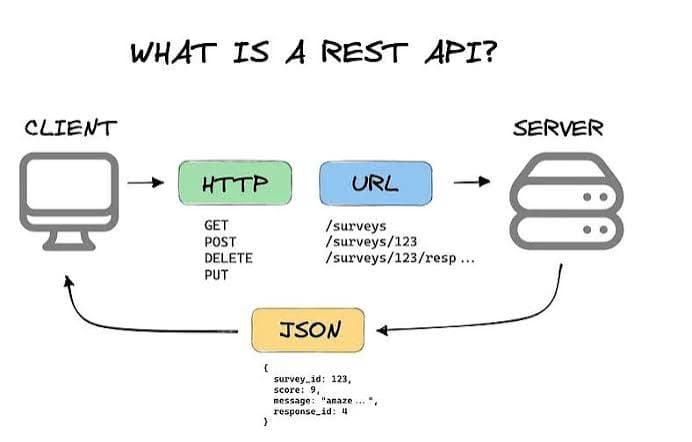
Definition: REST is an architectural style for designing distributed systems, particularly web services. The core idea is that everything in REST is treated as a resource, and these resources can be represented in different forms (JSON, XML, HTML, etc.).
Key Principles
- Resources are central
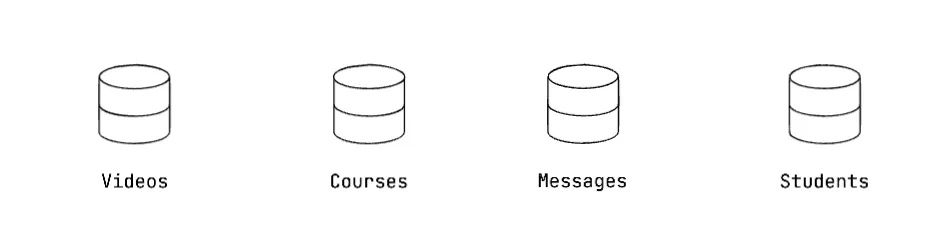
- Every entity in the system is modeled as a resource.
- Example in an LMS (Learning Management System):
students
courses
messages
videos
- Resource identification
- Each resource is uniquely identified by a URI (Uniform Resource Identifier).
- Example:
/students/123→ Student with ID 123
/courses/45/videos→ Videos in course 45
- Representation of resources
- A resource can have multiple representations (e.g., JSON, XML).
- The client asks for a specific representation (via headers like Accept: application/json), and the server responds accordingly.
- Example:
GET /students/123
Accept: application/json
- Response:
{ "id": 123, "name": "Alice", "email": "alice@example.com" }
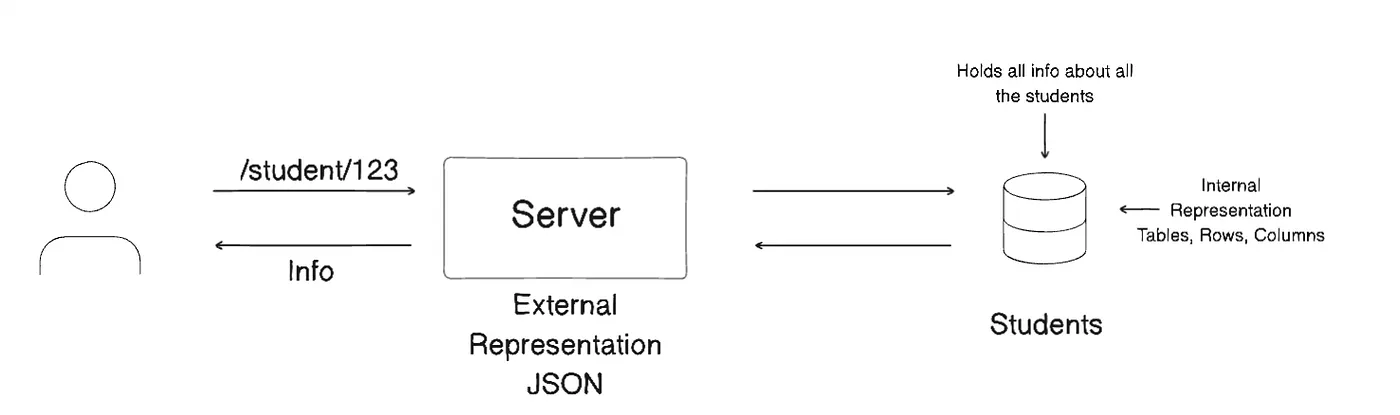
- Decoupling storage from representation
- REST does not dictate how resources are stored internally.
- Example:
- Students could be stored in a MySQL table.
- Messages could be in MongoDB.
- Videos could be in a file storage system.
- What matters is that the server exposes these as RESTful resources, independent of internal storage.
- Uniform interface (CRUD over HTTP)
REST maps standard HTTP methods to resource operations:
GET /students→ Retrieve a list of students
GET /students/123→ Retrieve a single student
POST /students→ Create a new student
PUT /students/123→ Update student 123
DELETE /students/123→ Delete student 123
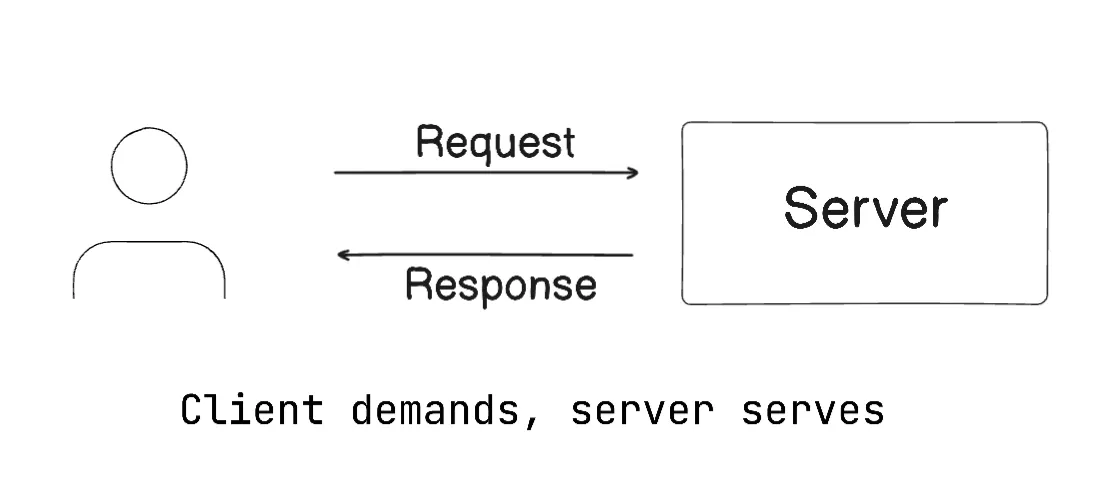
✅ In short: REST is about treating entities as resources that are exposed over HTTP via URIs. The client requests representations, and the server responds, regardless of how the data is stored internally.
Representation in REST
- What is a Representation?
- A representation is the format in which a resource is transferred between the server and the client.
- The same resource (e.g., a student entity) can be represented in different formats like JSON, XML, or plain text.
Example:
GET /students/123
Accept: application/json
Response (JSON):
{ "id": 123, "name": "Alice" }
Response (XML):
<student><id>123</id><name>Alice</name></student>
👉 REST does not restrict the format — but in modern systems, JSON is the de facto standard.
- Content Negotiation
- The client tells the server which representation it wants via headers:
Accept: application/json
Accept: application/xml
- The server responds in a supported format, or with
406 Not Acceptableif it can't provide the requested representation.
- Why Representations Matter?
- REST separates the resource (the conceptual entity, like a student) from its representation (the serialized form sent over the network).
- This ensures flexibility:
- Internally, you may store the student in Postgres,
- But return it to the client as JSON or XML, depending on demand.
CRUD Operations with Representations
- The client works with representations to perform operations:
- Create a resource
POST /students
Content-Type: application/json

{ "name": "Alice", "email": "alice@example.com" }- Retrieve a resource
GET /students/123
Accept: application/json- Update a resource
PUT /students/123
Content-Type: application/json

{ "id": 123, "name": "Alice Johnson", "email": "alice@example.com" }- Delete a resource
DELETE /students/123👉 Notice that when updating, the client sends back a representation (e.g., JSON body) to modify the resource.
✅ In summary about Representation in REST:
- REST doesn't define how to store data — it defines how to exchange it as representations.
- The client requests a resource in a representation it supports.
- The server responds with that representation.
- Operations (CRUD) are all performed through representations.
REST and Underlying Protocol
- Protocol Independence
- REST is an architectural style, not a protocol.
- It does not mandate using any specific transport protocol.
- In theory, RESTful principles could be applied over protocols like HTTP, HTTPS, FTP, SMTP, or even custom protocols.
- Common Implementation
- In practice, REST is almost always implemented over HTTP/HTTPS, because:
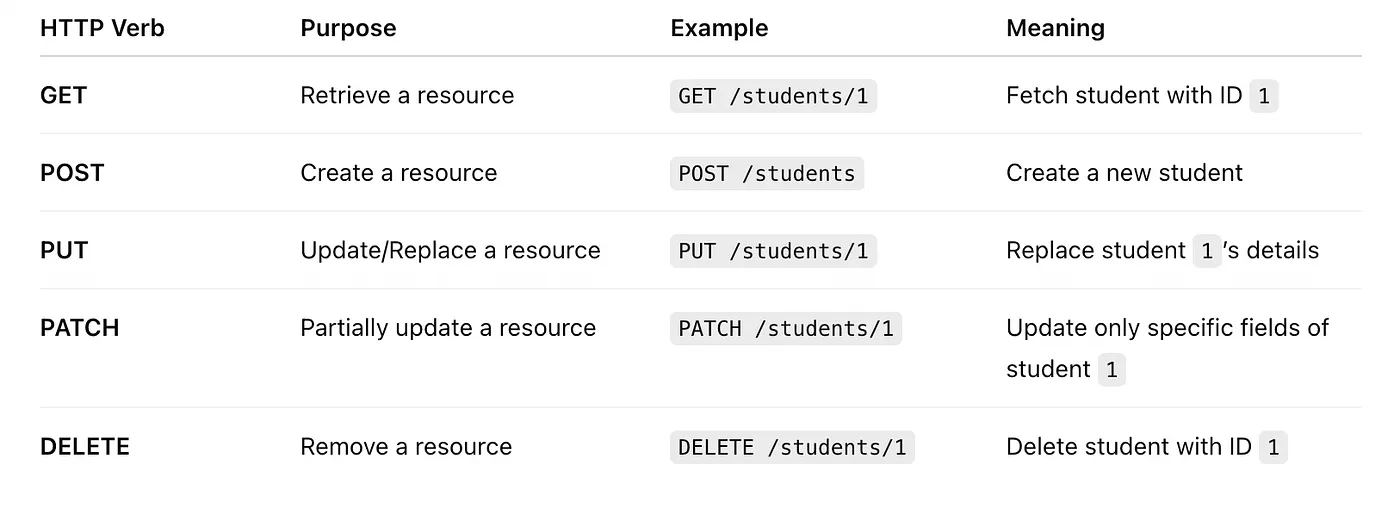
- HTTP already provides standard verbs (
GET, POST, PUT, DELETE) that map naturally to CRUD operations.
- HTTP headers support content negotiation (
Accept, Content-Type) which is essential for resource representations
- HTTP is ubiquitous and supported by all clients (browsers, mobile apps, IoT devices).
- REST ≠ HTTP
- REST is a specification/architectural style.
- HTTP is just the most widely used protocol to implement REST services.
Example: REST over HTTP in an LMS
GET /students/101
Host: api.lms.com
Accept: application/json- Key Point
Response:
{
  "id": 101,
  "name": "Alice",
  "email": "alice@example.com"
}
Here:
- REST principle: "Resource (student) requested via URI."
- HTTP protocol: Used to transport the request and response.
✅ In summary:
- REST is an architectural style, not tied to any single protocol.
- HTTP/HTTPS is the de facto standard because its features (verbs, URIs, headers, status codes) align perfectly with REST.
REST and HTTP
Although REST is not tied to HTTP, HTTP is the most natural fit because:
- HTTP Verbs map directly to CRUD operations
- Each HTTP method has a well-defined meaning, so the API design becomes predictable and consistent.
- Predictable Endpoints vs RPC-style Endpoints
- RESTful design leverages HTTP verbs instead of embedding actions in endpoint names.
❌ RPC-style (not RESTful):
/getStudent
/updateStudent
/deleteStudent
✅ RESTful:
GET    /students/1      → fetch student details
PUT    /students/1      → update student details
DELETE /students/1      → delete student
👉 By looking at the HTTP verb + resource URI, you already know the operation — no need for action words in the URL.
- Example: Student Resource in LMS
- Retrieve a student
GET /students/1Fetch details of student with ID 1.
- Create a student
POST /students
Content-Type: application/json

{ "name": "Alice", "email": "alice@example.com" }- Update a student
PUT /students/1
Content-Type: application/json

{ "id": 1, "name": "Alice Johnson", "email": "alice.j@example.com" }- Delete a student
DELETE /students/1✅ In summary: REST "goes very well" with HTTP because HTTP already has verbs, URIs, headers, and status codes that perfectly match REST's resource-oriented design. Instead of creating action-based endpoints, we simply combine HTTP verbs + resource URIs to express intent.
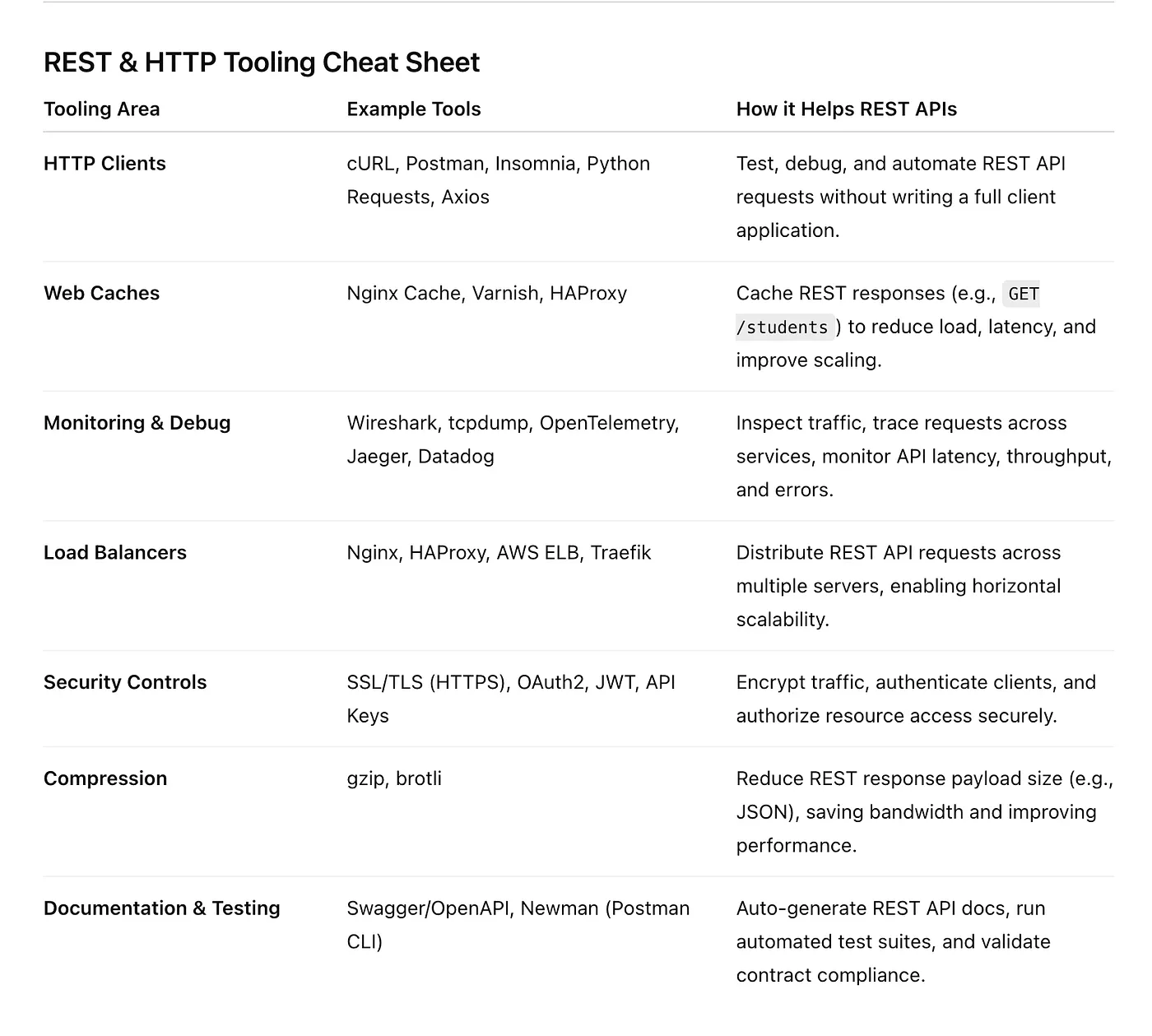
HTTP and Tooling for REST One of the biggest advantages of building RESTful APIs on top of HTTP is that the entire internet already runs on HTTP, so we inherit a mature, battle-tested ecosystem of tools, infrastructure, and best practices.
- HTTP Clients (for testing and automation)
- cURL → Command-line tool for making HTTP requests.
- Postman / Insomnia → GUI tools for designing, testing, and documenting APIs.
- Requests (Python), Axios (JavaScript), Fetch API → Popular libraries for programmatic HTTP calls.
These tools make it easy to test REST APIs without writing extra code.
- Web Caching
- Nginx Cache, Varnish, HAProxy → Cache REST responses to reduce server load and improve performance.
- HTTP itself has built-in caching headers (ETag, Cache-Control, Last-Modified) that work seamlessly with REST APIs.
Example: A GET /students response can be cached for 60 seconds using:
Cache-Control: max-age=60- HTTP Monitoring & Debugging
- Tracing tools: OpenTelemetry, Jaeger → Trace REST calls across microservices.
- Packet sniffing: Wireshark, tcpdump → Inspect low-level HTTP traffic.
- API monitoring: New Relic, Datadog → Monitor latency, error rates, and throughput of REST endpoints.
👉 Because REST uses HTTP, all existing network-level monitoring tools work out-of-the-box.
- Load Balancing
- Tools like Nginx, HAProxy, AWS ELB, Traefik distribute incoming HTTP requests across multiple servers.
- REST APIs benefit from horizontal scaling with zero changes to API design.
- Security Controls
- SSL/TLS (HTTPS) → Secure REST APIs against eavesdropping and tampering.
- OAuth2, JWT, API keys → Standardized security layers built on top of HTTP headers (Authorization header).
- Compression & Optimization
- REST APIs can use HTTP compression (gzip, brotli) to reduce payload size.
- Example:
Accept-Encoding: gzip
Server responds with compressed JSON, reducing bandwidth costs.
✅ In summary: Because REST commonly runs over HTTP, it can immediately leverage decades of tooling: clients (Postman, curl), caches (Nginx, Varnish), monitoring (Wireshark, Datadog), load balancing (HAProxy), and security (SSL/TLS, OAuth2). This ecosystem is a big reason REST became the default choice for web APIs.
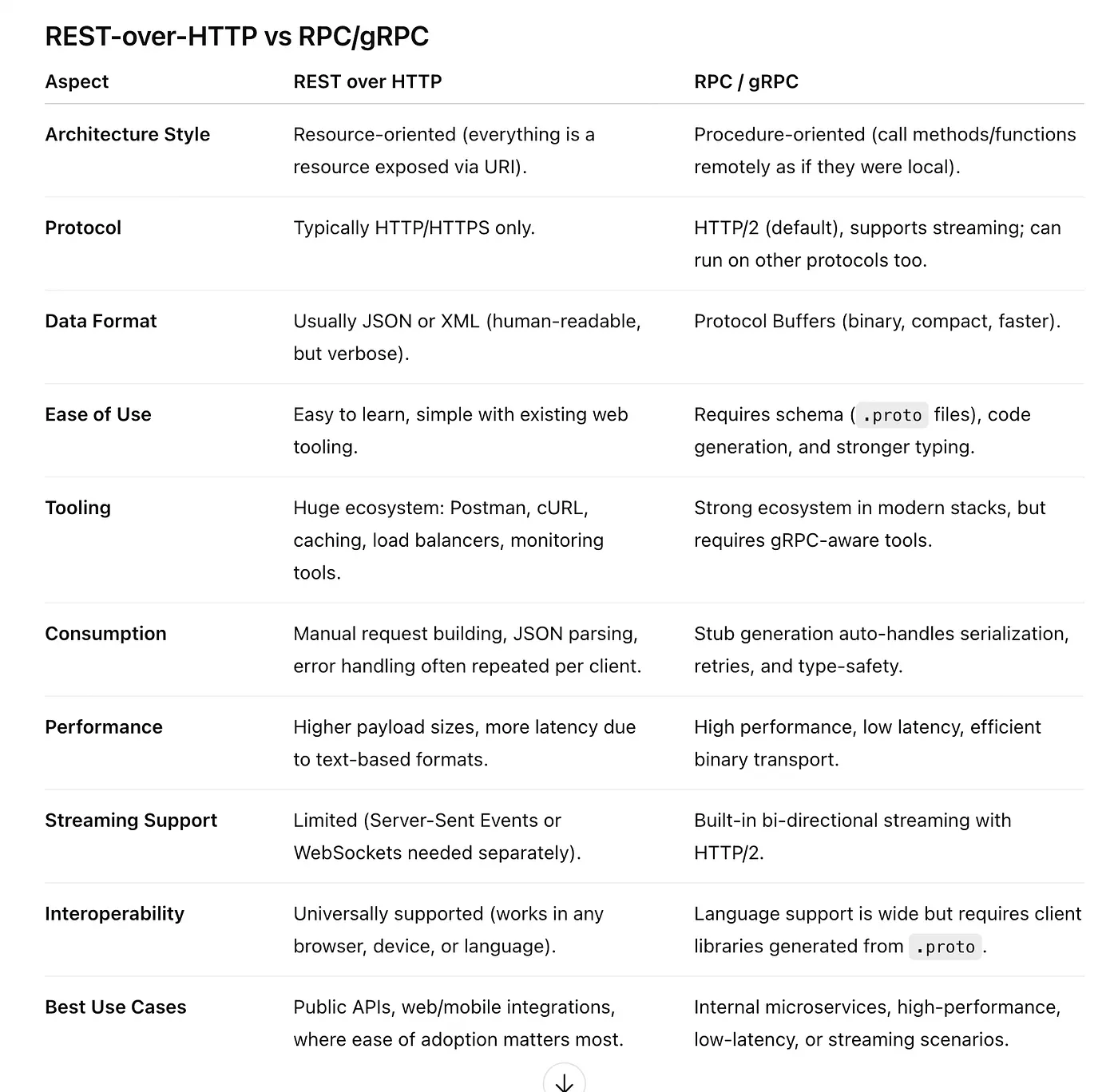
Downsides of REST over HTTP
While REST over HTTP is popular, it has some limitations and drawbacks compared to alternatives (e.g., gRPC, GraphQL, or custom protocols).
- Consumption is Not Easy
- REST APIs require an HTTP client to send requests and parse responses.
- Unlike RPC frameworks (which generate native stubs for direct method calls), REST requires:
- Building an HTTP request,
- Parsing JSON/XML responses,
- Converting them into native objects.
- This adds extra development effort, especially across multiple languages.
- Repetitive Consumption Logic
- Every consumer must re-implement common concerns:
- Serialization / Deserialization (JSON ↔ Objects)
- Handling errors, failures, timeouts, retries
- Compression and decompression
- While large organizations often create shared client libraries, smaller teams may duplicate this effort, leading to inconsistencies.
- Limited HTTP Verb Support
- REST relies on HTTP verbs (
GET, POST, PUT, PATCH, DELETE).
- However, not all web servers, proxies, or firewalls fully support these verbs.
- Some only allow
GETandPOST.
PUT, PATCH,andDELETEmay be blocked or unsupported.
- This forces API designers to "tunnel" updates through
POST(e.g., /updateStudent), reducing REST's elegance.
- Large HTTP Payloads
- REST commonly uses text-based formats (JSON, XML).
- These payloads are verbose compared to binary protocols (like gRPC with Protocol Buffers).
- Downsides:
- Higher bandwidth usage
- Higher serialization/deserialization cost
- Not ideal for low-latency or resource-constrained environments (e.g., IoT, real-time systems).
- Protocol Lock-In
- REST is tightly coupled with HTTP/HTTPS.
- Unlike message-based or RPC systems, you cannot easily switch protocols (e.g., TCP ↔ UDP, WebSockets) without redesigning your API.
- This limits flexibility in scenarios where a lighter or faster protocol might be better.
✅ In summary: REST over HTTP is widely used because of its simplicity, ubiquity, and tooling support, but it has downsides: harder consumption, repetitive client logic, limited verb support, heavy payloads, and protocol rigidity.